An invoice in under a minute, straight from approved work
Turn time entries, contracts, and projects into invoices ready for KSeF in Poland and ANAF in Romania. Flowtly generates recurring invoices from payment schedules and drafts payment reminders for you to approve, with costs and cash in the same system.
The animated diagram above is illustrative: it shows how the records connect, with sample figures, not a customer’s data or a live screen.
How it works
Approve the work
Time entries, milestones or a contract’s payment schedule are approved in Flowtly.
Draft the invoice
Flowtly builds the invoice from approved work, with your rates and the client’s details.
Send and follow up
Send it, and drafted payment reminders wait for your approval.
How it works in Flowtly
Screenshots of the running product, taken in demonstration organisations with sample data. Select a screenshot to open it full size.
1Start an invoice: the due date follows the client’s payment term, and you pick the bank account and currency. 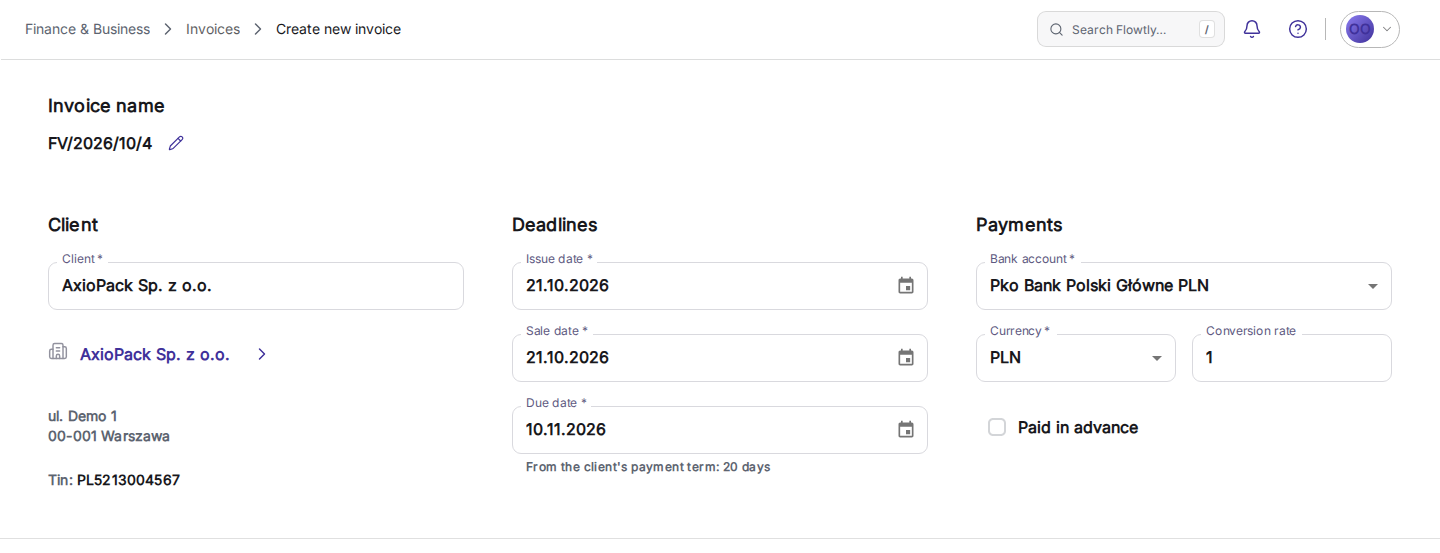
2Enter quantity, unit and net price; net value, VAT and gross are calculated, and each line can carry a project and tags. 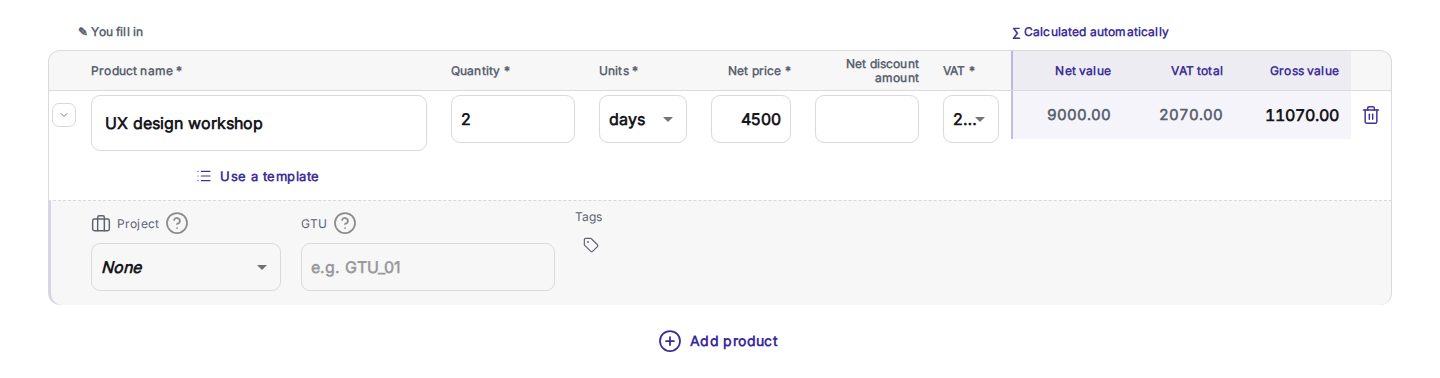
3Send it by email from Flowtly, with CC recipients, attachments and a message that carries the payment details. 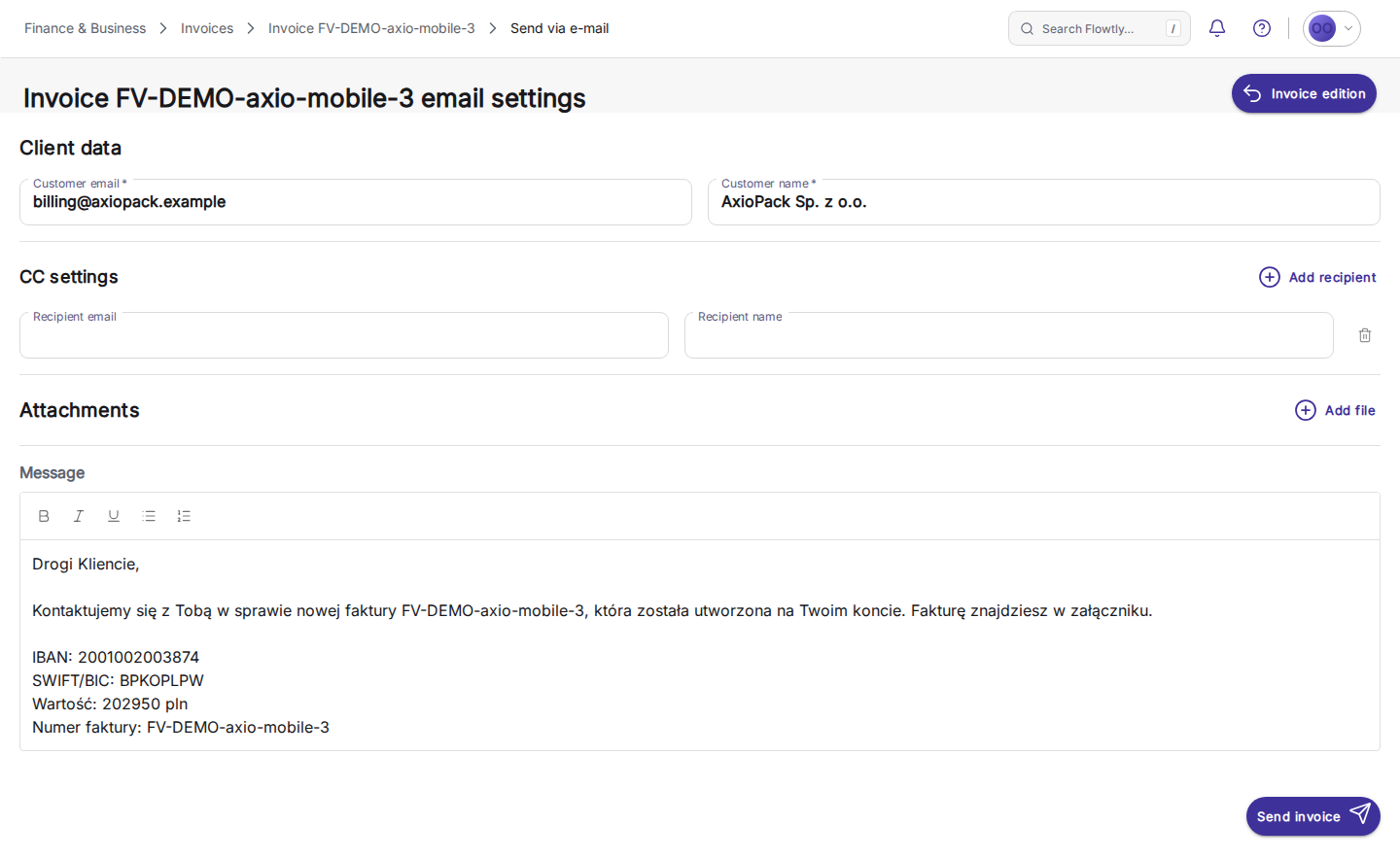
4Invoices are grouped by month, with the payment status on every row and a column for e-invoicing status. 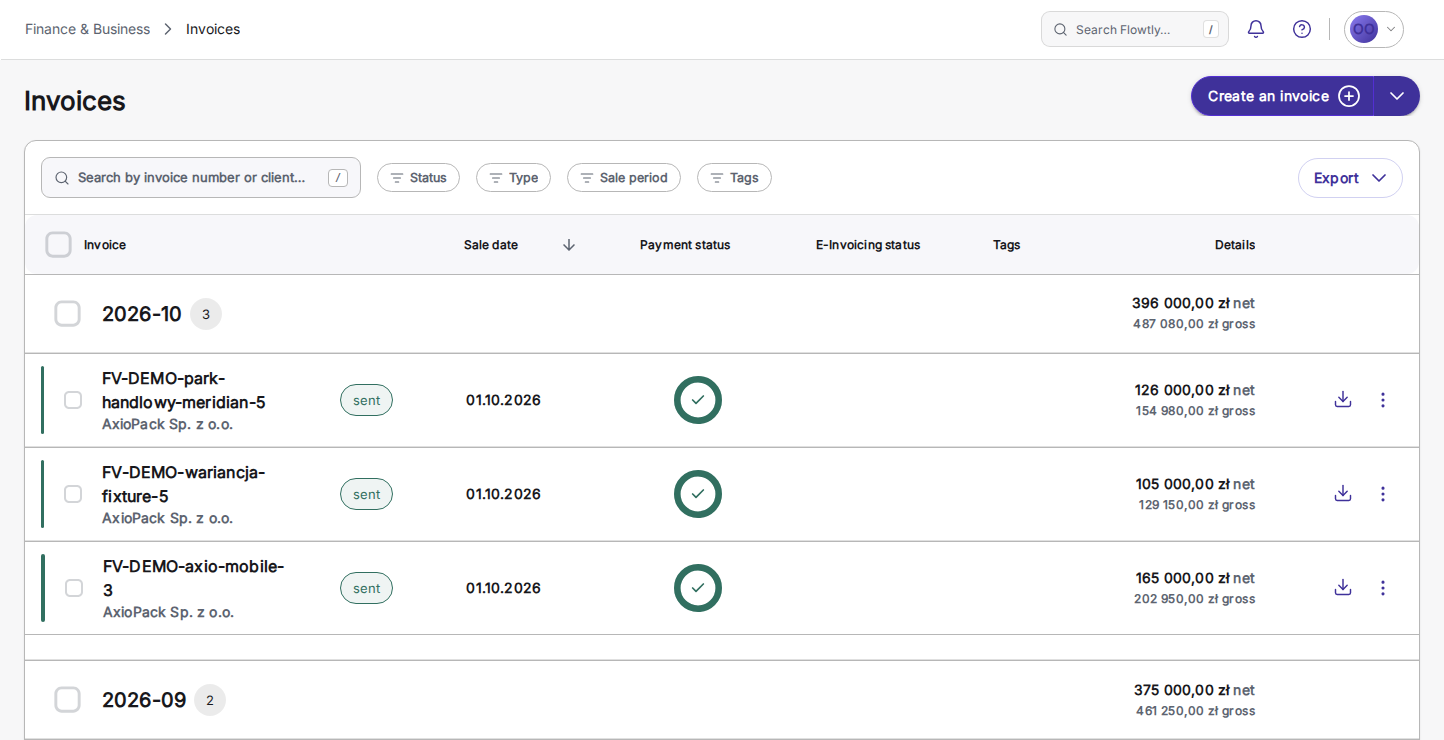
Templates, duplicates and tax presets
Start from a template or duplicate a past invoice, with saved clients and tax presets. An invoice takes under a minute, and no training is needed.
E-invoicing built in: KSeF in Poland and ANAF in Romania today, Peppol and Factur-X planned
No extra tool, no extra fee. KSeF (for Polish entities) and ANAF e-Factura (for Romanian entities) are supported today; Peppol and Factur-X are planned.
Recurring and subscription billing
Define a payment schedule on a contract once, and Flowtly generates each recurring invoice from it.
Invoice from approved hours, projects, and contracts
Timesheets, project milestones and contract retainers turn into invoice lines automatically, so each invoice reflects the work your team logged.
Overdue follow-up you approve
A daily check drafts a reminder for every overdue invoice that is not fully paid, and after a part payment it asks only for what is left. You review each draft, edit it or add CC, and approve it before it is sent; sent, dismissed and failed reminders stay in the history. Bank integration then matches the payment when it arrives.
The wording each client expects, written once
Store the sentence a client’s contract requires, for example “Infrastructure access fee, 18 Mill Street, for period 07/2026”, as a template on its counterparty, with the month or quarter filled in for each billing period. Pick it while writing a line and see exactly what will print. The template fills the description only: quantity, price and VAT stay as you set them, and invoices already sent are never rewritten.
Invoicing & clients
- Auto-generate invoices from logged hoursGenerate an invoice for a client project and period straight from its logged hours. Each team member becomes a row at their project rate, billed for the exact time logged, with VAT pre-filled from the client’s country and missing rates flagged beforehand.Read the guide
- Multi-currency, VAT and tax rule supportInvoice clients in their own currency, with the exchange rate stored on each invoice; Flowtly converts other currencies at daily National Bank of Poland rates for budgets, reports and exports. Tax groups apply VAT rules per country to invoice lines.Read the guide
- Suppliers and clients, auto-enrichedKeep one registry of every client, supplier, and partner with tax IDs and payment terms, automatically enriched with public business data, with duplicate detection and merge to keep it clean.Read the guide
- Bulk invoice generation from timesheets and projectsSelect several projects or timesheet entries and generate their invoices in one batch. Each invoice can be reviewed and adjusted before finalisation, follows the same numbering and tax rules as a single invoice, and can bill a project’s phases with it.Read the guide
- Overdue reminders drafted for you, sent by youOnce switched on, a daily check drafts a reminder for each overdue sales invoice, stating only the outstanding remainder. You review, edit and approve each draft; nothing goes out automatically.Read the guide
- Set-offs with one counterparty, started from remindersFrom the payment reminders queue, record a set-off with one counterparty: tick invoices with a reminder waiting and cost documents whose amounts balance exactly. The amount due drops and settled reminders are dismissed; you deliver the declaration yourself, and Flowtly records it.Read the guide
- Client-specific wording on invoice linesSave the sentences a counterparty expects, such as a contract reference, with the billing month or quarter filled in, and pick one while writing a line. It only fills the description: amounts, VAT and invoices already sent stay untouched.Read the guide
- Point of sale for counter salesFor a shop that sells goods over a counter: a product catalogue with tax-inclusive prices, a stock ledger that records every delivery, sale and count, and a till that issues the invoice and lowers stock in one step. Clerks never see buying prices or margin.Read the guide
Finance & profitability
- Bank sync and reconciliationConnect your bank to import transactions automatically, or upload MT940 statements, then match payments to invoices.Read the guide
- Accountant questions on the recordAsk and answer questions about a bank transaction or cost invoice on that record, in one thread between the accountant and the team. A Questions inbox and an unresolved badge show what is still open at month-end.Read the guide
- A period’s invoices as one PDF archiveAsk your connected AI assistant for every invoice issued in a month and get one ZIP of PDFs, dated by sale date like the accountancy exports. It holds sent invoices and corrections, including those accepted by KSeF for Polish entities, never drafts.Read the guide
Document management
- Documents attached to every invoiceKeep receipts, contracts, and supporting files linked to the invoice or cost they belong to, so the books are document-complete and audit-ready.Read the guide
How do I bill every hour the team logged?
Hours are logged in one tool and invoices are typed in another. At month-end someone copies the totals across by hand, and whatever slips through the gap is work you delivered and never billed.
Flowtly starts the invoice from Work Time itself: filter by project or employee, and the logged hours become a new invoice that you check before it is issued. Bulk invoicing does the same for many client projects in one pass.
From Work Time (example)
Illustrative example
Built from the hours you filtered
How do I chase late payers without writing every email?
Overdue invoices sit in a list until someone has time to notice them. Then each reminder is written from scratch, often for the full amount, even when the client has already paid part of it.
With payment reminders switched on, Flowtly drafts a reminder every day for each overdue invoice that is not fully paid, asking only for what is still outstanding. A finance user reviews, edits and approves each draft; nothing is sent automatically.
Reminder draft (example)
Illustrative example
Waiting for your approval
Flowtly vs standalone invoicing tools
Flowtly
- Connected to hours, projects, and contracts.
- One system for invoices, costs, and cash.
- Employee-cost aware out of the box.
- Project margin in real time.
- KSeF in Poland and ANAF in Romania included; Peppol and Factur-X planned.
Standalone invoicing tools
- Isolated from your ops — time, projects, and HR live elsewhere.
- Manual re-entry from hours and contracts.
- A separate tool (and bill) for costs and cash.
- No project profitability view.
- Limited employee-cost linkage.
Work out what it is worth
Planned for this module
Not available yet. These are on our roadmap with no date; what the module does today is described above.
- Planned
Quotes and estimates
Draft a quote, send it for approval and turn the accepted quote into a project and its first invoice.
- Planned
Pay-by-link on invoices
A payment link on an invoice so a client can pay by card or BLIK.
Is e-invoicing included in every plan?
Can I invoice from logged hours automatically?
Can clients pay invoices online?
Does Flowtly support multi-currency invoicing?
Can I set up subscription or recurring invoices?
Does Flowtly send payment reminders to my clients automatically?
Keep going
See the full finance picture
Costs, budgets, and cash in one view — beyond just invoices.
Working with your accountant
Give your accountant a free seat and stop the email ping-pong.
Learn it step by step
From the knowledge base
Related terms
An invoice in under a minute , straight from approved work