Every logged hour, costed and ready to bill
The agreement’s weekly hours set each person’s daily timesheet target. Time is logged against projects and clients, approved, priced at each person’s rate and shown on the project as team cost, month by month.
How it works
Log the hours
Team members log time against projects and tasks, in the browser or on their phone.
Approve them
A manager approves the hours before they count.
Cost and bill
Each approved hour carries its rate into project cost and the next invoice.
How it works in Flowtly
Screenshots of the running product, taken in demonstration organisations with sample data. Select a screenshot to open it full size.
1Set the working time on the agreement: weekly hours give the FTE, the daily timesheet target and how leave accrues. 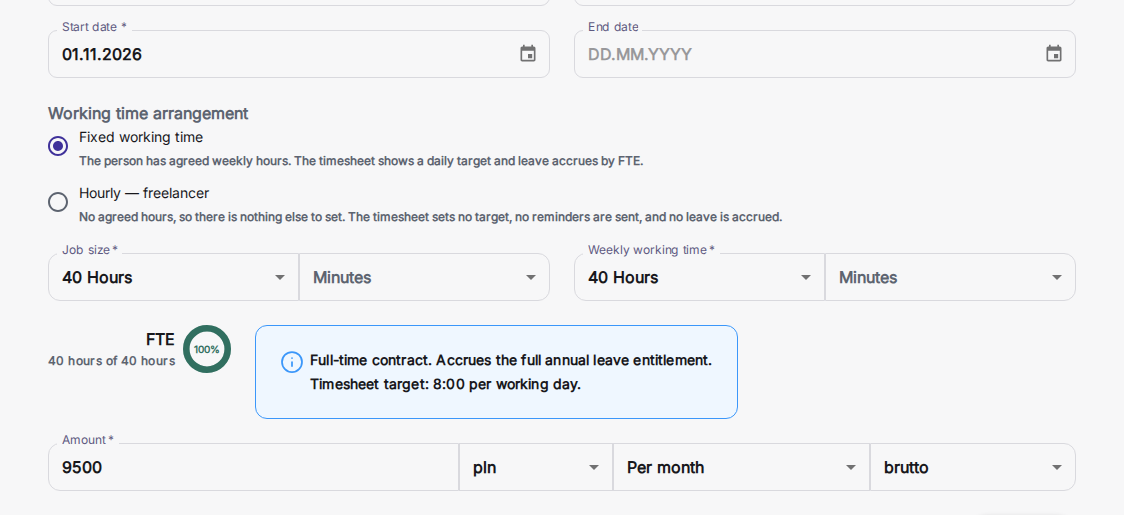
2Open a project’s financials: everyone who logged time appears with what their hours cost, month by month. 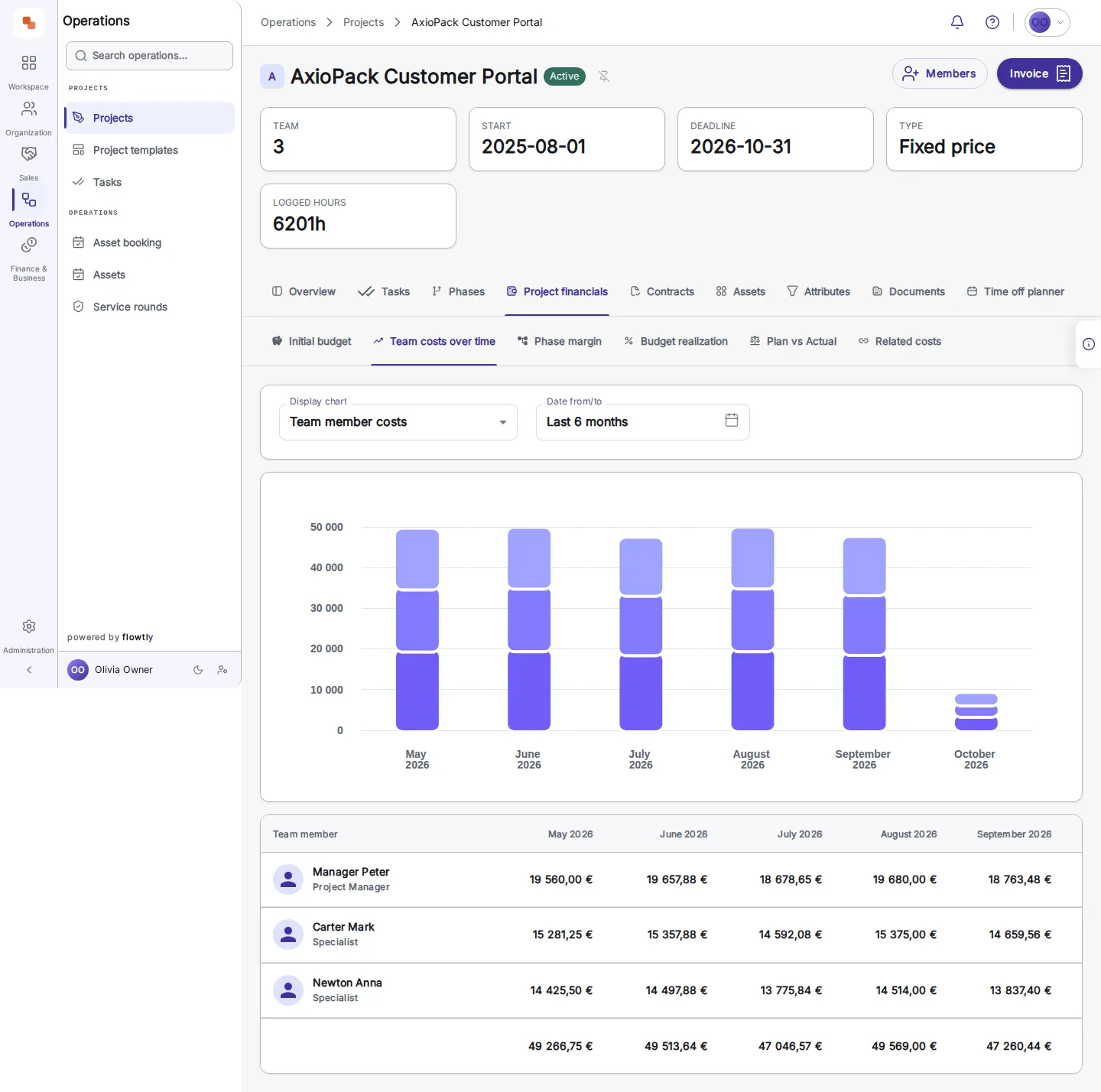
3Compare plan with actual, month by month: income and expense variance and the actual net result. 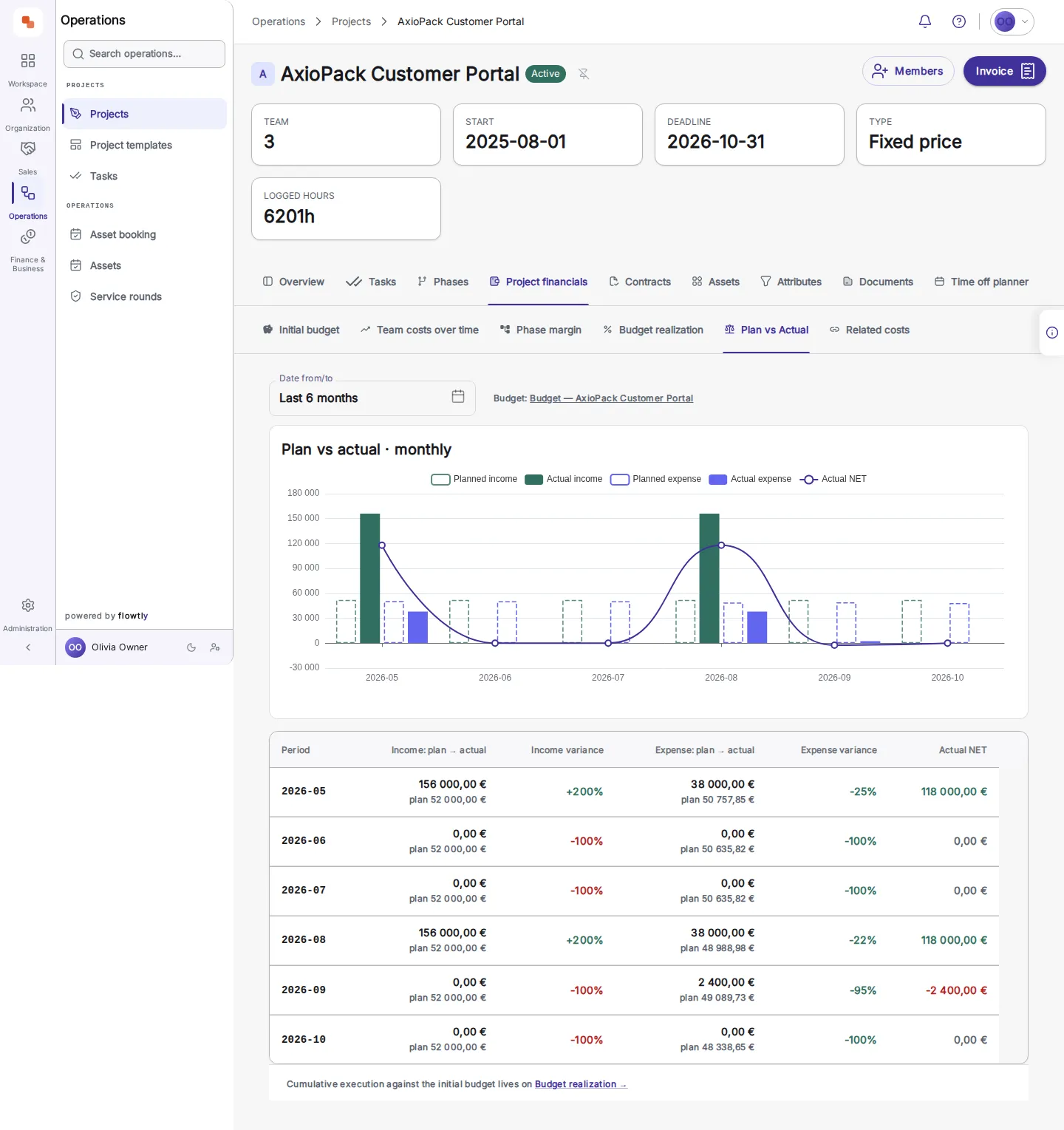
Team cost per project, month by month
Everyone who logged time on a project appears in its financials with what their hours cost, next to income and expense plan against actual, so an overrun shows while the project is still running.
Exports PDF/CSV
Export time reports as PDF or CSV to send to a client or keep with the project.
Invoices from approved hours
Approved time entries feed the invoice, so billable hours are neither retyped nor missed.
Multi-currency rates for each team member
Set billing rates per person and per project, in more than one currency, on the Rates tab of each profile.
Client reports from the same entries
Hours linked to projects and clients feed real-time FTE, productivity and project reporting, so a client report is a filter, not a spreadsheet.
A daily target from the agreement
Fixed weekly hours on an agreement set the FTE and the daily timesheet target, for example 8:00 per working day on a 40-hour week. An hourly freelancer agreement sets no target and sends no reminders.
Time tracking & productivity
- Easy time logging with monthly project sign-offTeam members log hours against their projects in Work time, with several entries a day and a minimum description length if you set one. At month end, each client project’s account manager reviews and signs off its hours and rates, so finance can invoice them.Read the guide
- Link time entries to projects and clientsEvery time entry is logged against a project or phase, and the project’s client carries through to rates, invoices and the client summary report. Correct a misplaced entry by moving it to another project, unless the project it leaves has already been invoiced.Read the guide
- Custom rates and billing classificationsSet each team member’s hourly rate per client project, with the position shown on the invoice and dated rates that Extend keeps as history. Default prices can follow attributes such as seniority, and projects are fixed-price, time & material, non-billable or internal.Read the guide
- FTE-aware hours, utilisation and project reportingActuals sets each person’s planned hours against the hours they reported, week by week, measured against their own contracted week and FTE. Timesheet exports group hours by team member, project or task, and computed project KPIs are recalculated each time they are read.Read the guide
Work out what it is worth
What hours that never reach an invoice cost in a year, and how a sign-off stops it.
Billable hours and the margin they earnYour billable share, and the margin left once every logged hour is paid for.
What outdated rates cost youThe yearly gap between your rate card and the rates you actually bill.
Does a part-time agreement change the timesheet target?
Can logged hours be billed to the client?
Where do I see what the hours cost?
Learn it step by step
From the knowledge base
Related terms
Every logged hour, costed and ready to bill