Flowtly builds each project budget from your contracts, employee time, invoices, and transactions — then shows planned vs actual, a live forecast to completion, and the income you’ve signed or still have in the pipeline.
The animated diagram above is illustrative: it shows how the records connect, with sample figures, not a customer’s data or a live screen.
How it works
1
Set the budget
Plan income and cost per project, or let contract payment schedules fill it in.
2
Let actuals flow in
Issued invoices, supplier costs and logged hours update the actual side.
3
Act on the forecast
Compare planned with actual, and get an alert before a budget runs over.
How it works in Flowtly
Screenshots of the running product, taken in demonstration organisations with sample data. Select a screenshot to open it full size.
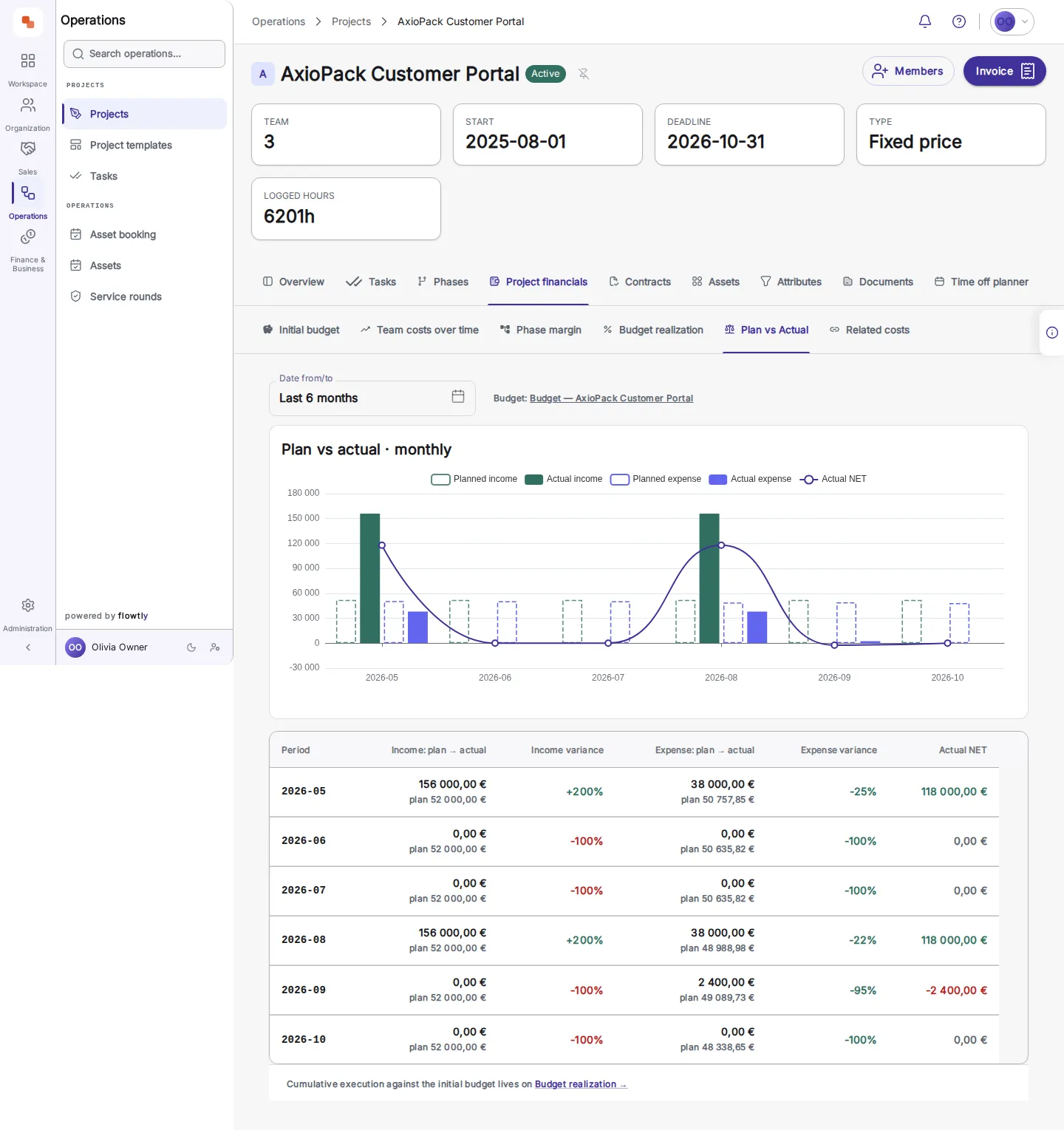
1Compare plan with actual, month by month: income and expense variance and the actual net result.
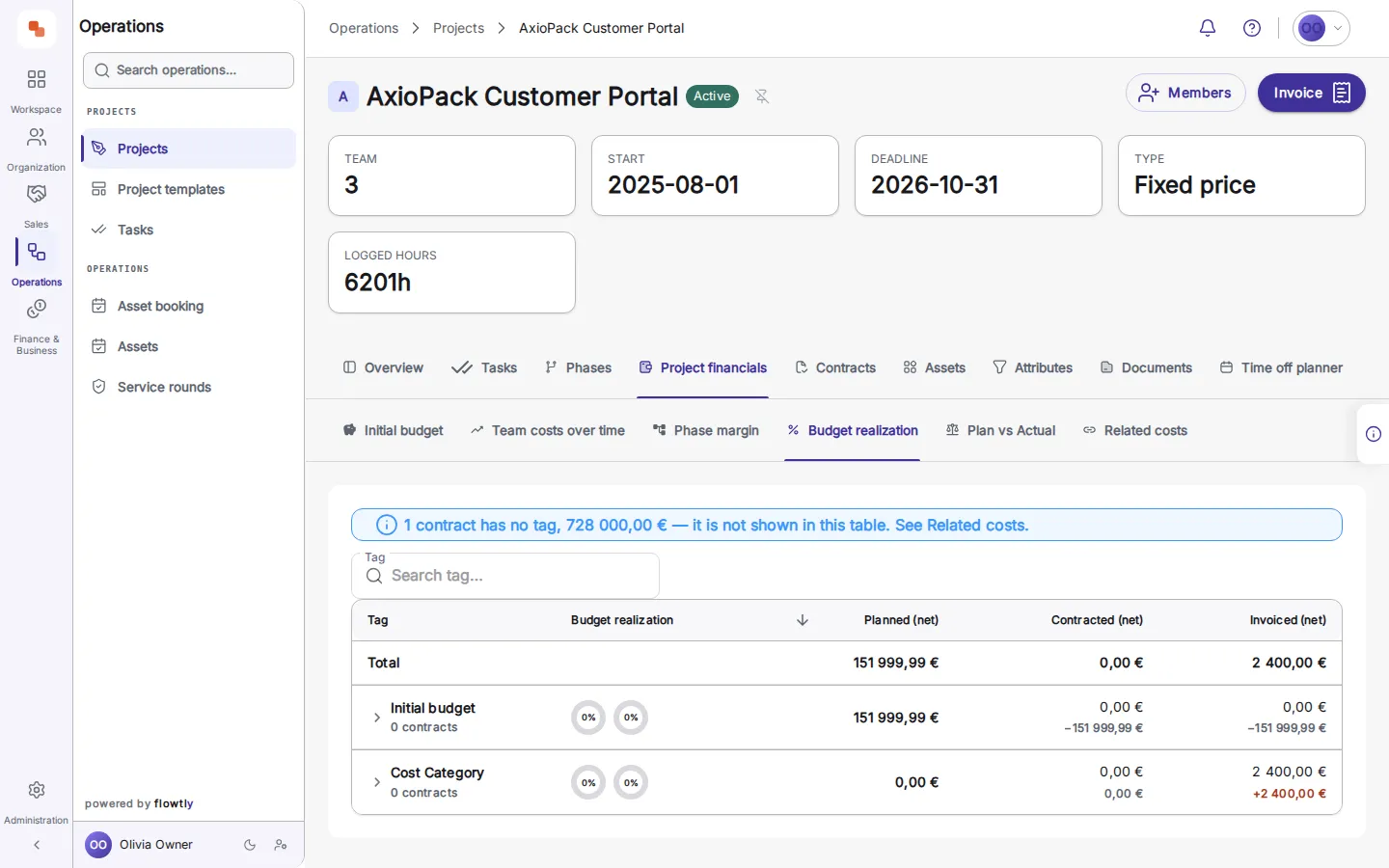
2Read budget realisation: planned, contracted and invoiced stay in separate columns, and the view names any contract it leaves out.
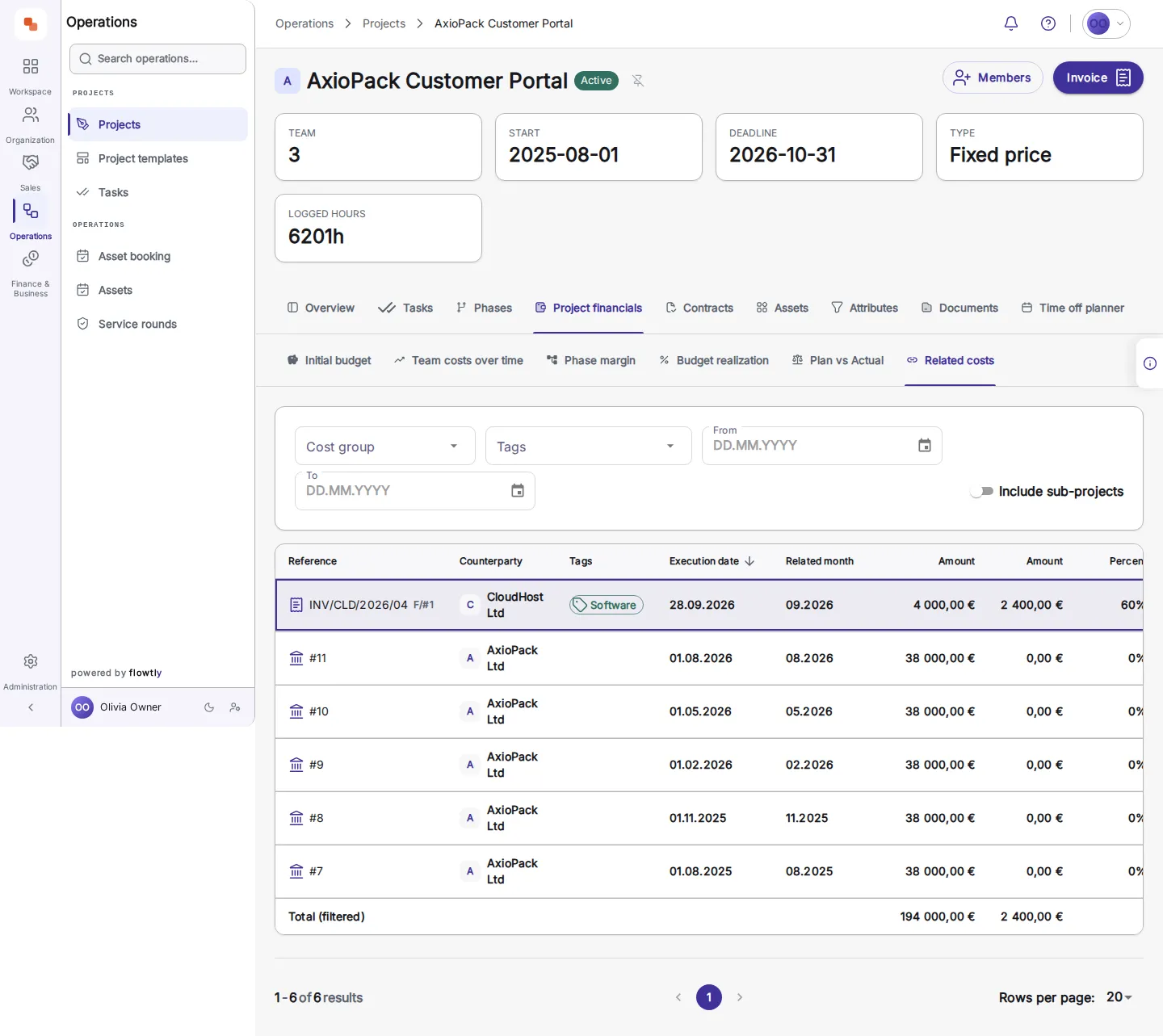
3See shared costs on the project: each allocated supplier invoice with its amount and the share assigned to this project.
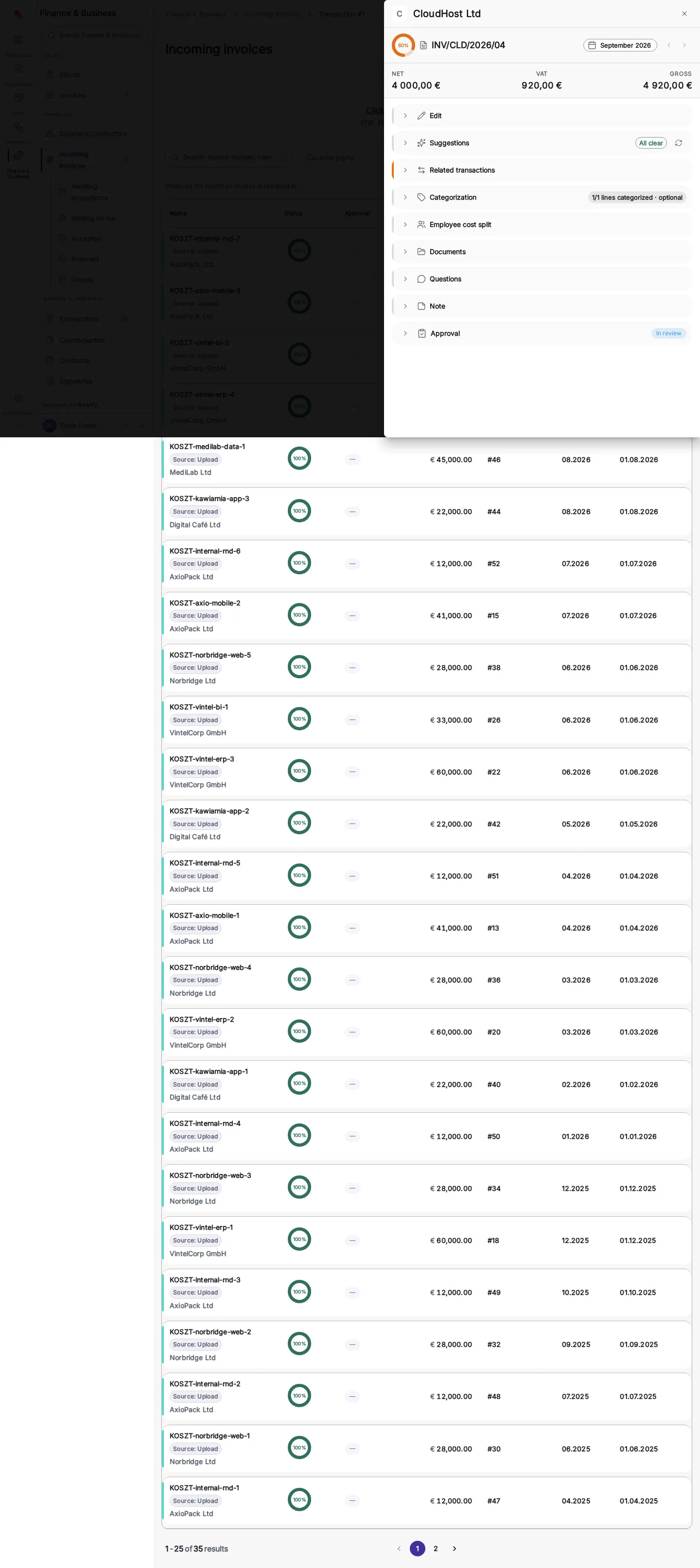
4Follow it to the source: the incoming invoice with its net, VAT and gross amounts and its approval state.
Built from the work you already track
Contracts, employee time, invoices, and transactions flow straight into the budget — no re-keying. Every figure traces back to a real record you can open.
Planned vs actual, in real time
Watch committed and invoiced spend fill against the plan as the project runs. Catch an overrun the week it starts, not at quarter-end.
A forecast that reads as a forecast
Flowtly projects the final cost from run-rate and commitments — shown as a prediction, never dressed up as a fact, so you always know what’s real and what’s expected.
Income and pipeline, not just cost
See signed revenue alongside potential income from open deals and leads. A budget becomes the whole P&L picture — money in as well as money out.
Realisation by tag, drillable to the line
Planned → contracted → invoiced, broken down by cost tag and drillable to the exact contracts and invoices behind every number.
Alerts before the period closes
Every morning Flowtly checks each budget that has a plan. Costs more than 10% over plan, a finished period’s margin 5 points or more below target, or costs already eating into the running period’s margin each raise one notification, in the bell and by push, with actual against plan and a link to the budget. It is a daily check, not a live feed: every alert states the date its figures are current to and says so when bank data is incomplete.
A budget that includes next month’s projects
Choose all projects, minus any you exclude, or all contracts of the projects the budget covers. The choice is stored as a rule rather than a list, so a project or contract created later is covered without anyone reopening the budget. You can start in observation mode, tracking actual income and costs with no plan, and add monthly amounts with percentage, fixed or per-unit growth when you are ready.
Shared costs, counted once at the right share
When a supplier invoice is split across projects, each budget counts only the share allocated to it, and each cost sits in the month its document relates to, not the month it was paid. Example: a site security invoice split by building share and then by tenant floor area appears on every tenant’s project as the full invoice amount next to that project’s share, so the same invoice is never counted twice.
Signed contracts, read into the plan
Upload a signed contract and Flowtly reads it: for example both parties, a start date, payment 14 days from invoice delivery and a monthly fee. You check every suggested field, correct what the scan got wrong and save. Once the contract has a payment schedule and reaches the budget through its project, its amounts become planned figures. A contract that states a rate but no total keeps the total empty; enter the term and, where the quantity is known, Flowtly offers a total marked as calculated for you to accept.
Finance & profitability
Daily budget alerts, before the period closesEvery morning Flowtly notifies a budget’s recipients when costs run more than 10% over plan or the margin falls below target. Each alert shows actual against plan and links to the budget; it never changes the budget for you.Read the guide
Profitability analytics by project and personProject financials compare planned and actual profit and loss, show billed, cost and margin on each initial-budget line, and gross margin can be tracked as a project KPI. The Resourcing Money view puts revenue, cost and margin on each person, drilled down by project.Read the guide
Track actuals before you plan, then add monthly plans with growth rulesAttach costs and invoices to a budget and follow actuals before any plan exists. When you are ready, plan month by month from a base amount, with exponential, linear or unit growth that carries into later months and years until you change it.Read the guide
Budgets and P&L you controlSet budgets per project, client, or team and track real spend against them. Catch overruns early and see profit and loss without building a spreadsheet.Read the guide
Your cash position, liveInflows and outflows in one real-time dashboard, by bank account and refreshed on demand. No exporting to chase the number that matters.Read the guide
Budgets that include tomorrow’s projectsCover all projects except those you exclude, or every contract of the covered projects, saved as a rule so new ones fall inside without reopening the budget. Start with actuals, then add a monthly plan with percentage, fixed or per-unit growth.Read the guide
Margin by project phaseOne row per phase shows what it invoiced, what its logged time and related costs came to, and the margin, for any date range. Costs dated after a phase closed are flagged, and the whole-project row adds what was booked on the project itself.Read the guide
P&L by personIn a budget that includes employee costs, a P&L by person tab shows what each person costs, and opening a person lists the direct-cost lines behind the figure. Currently a preview feature.Read the guide
Contracts & payment schedules
Define supplier and client contracts with explicit payment schedule linesCreate a purchase or sales contract with its name, direction and currency, then add payment schedule lines, each with an amount, due date and direction. Payment terms are held separately: deadline days, what they count from, and in advance or in arrears.Read the guide
Link contracts to budgets for automatic planned expense contributionsA budget plans from a contract’s payment schedule lines once it can reach the contract: through the contract’s project, by attaching the contract directly, or through budget tags. A contract with no schedule adds no planned figures.Read the guide
Filter by direction, status or linked project
Attach documents to contracts for audit-ready record-keepingAttach signed contract and annex files to the contract record, preview them in place or download them. The last contract document cannot be deleted, a contract with no signed file is flagged as missing one, and attached files are read to fill empty fields.Read the guide
Contracts read from the signed file, checked by youUpload signed contracts as PDF or image, and Flowtly reads parties, dates, payment terms and prices into a review screen that you correct and save. A rate-based lease gets no invented total, and a file added to an existing contract fills only empty fields.Read the guide
Purchase orders read against the workGive an order’s role lines a rate and estimated hours, and Order economics sets them against the hours logged per role and what they cost. A line over its estimate is flagged while the work is still running.Read the guide
How do I catch overruns early?
Problem
Costs surface at month-end, long after the decision that caused them. By the time the spreadsheet catches up, the overrun is already baked in.
Solution
Flowtly fills committed and invoiced spend against the plan as work happens — straight from your contracts, invoices, and transactions. The week a line starts to slip, you can see it.
Realisation
Illustrative example
Planned18 260 000 €
Committed98.6%
Invoiced53.2%
On track — forecast 99% of plan
How do I know a project’s true margin?
Problem
Revenue sits in one tool, costs in another, and the pipeline in a third. Working out whether a project actually made money means stitching exports together.
Solution
Flowtly keeps cost and income on the same budget — signed revenue, invoiced spend, and pipeline potential in one view — so margin is a number you read, not assemble.
Income vs cost
Illustrative example
Signed12 400 000 €
Cost (actual)9 722 000 €
Pipeline4 200 000 €
Signed income, actual cost and pipeline on one budget
Each project budget is built from records you already keep — contracts (the plan), plus employee time, invoices, and transactions (the actuals). Flowtly rolls them into two sides, planned and actual, so every figure traces back to a real document.
How does Flowtly show planned vs actual spend?
The plan comes from your contracts’ payment schedules; actuals come from invoices, settled transactions, and employee time valued at cost. Flowtly compares them live, so committed and invoiced spend fill against the plan as the project runs and overruns surface early.
How is the budget forecast calculated?
Flowtly projects the cost at completion from your run-rate and outstanding commitments. It is shown as a forecast — dashed, never presented as a booked figure — so a prediction is never mistaken for a fact.
Does a budget include income, not just cost?
Yes. Alongside cost, a budget shows income: revenue you have already signed, plus potential income from open deals and leads in your pipeline. Pipeline figures are marked as potential, so you see the whole P&L without overstating what is certain.
Do I have to build and maintain budgets by hand?
No. Because budgets draw straight from contracts, time, invoices, and transactions, they update themselves as work happens. You set the plan once, and Flowtly keeps the actuals, forecast, and realisation current.
Will Flowtly warn me when a budget goes off plan?
Yes. Every morning Flowtly checks each budget that has a plan and sends a notification, in the bell menu and as a push notification, when costs run more than 10% over plan, when a finished period’s margin is at least 5 points below target, or when costs already put the running period’s margin at risk. Alerts go to the budget’s own recipients, or to everyone who can manage budgets, and repeat only when the situation gets worse. You can switch them off per budget.
Can Flowtly read the contracts we have already signed?
Yes. Upload a signed contract as a PDF, PNG or JPEG and Flowtly reads the parties, dates, payment terms and prices into a review screen. Nothing is saved until someone allowed to manage contracts checks the fields and confirms them, and a file that cannot be read says why, with the option to read it again or upload a clearer copy. Adding a document to an existing contract only fills fields that are still empty, and re-reading a document asks before it overwrites anything.
What do our customers say about Flowtly?
Thanks to Flowtly, we were able to automate key business processes, significantly increasing our efficiency and saving time. We especially appreciate the budget and cost management module, which helps us better control expenses and optimise costs.
Result: The team better controls expenses and optimises costs across projects.