Answer any question about a team member from one profile
Agreements with their working time and FTE, time off balances you can explain, permission groups, project rates, benefits and documents are tabs on the person’s profile, and the team list flags anyone without an active agreement.
The animated diagram above is illustrative: it shows how the records connect, with sample figures, not a customer’s data or a live screen.
How it works
Create the profile
Add a team member with contact details, role and manager.
Attach agreements
Store contracts and their versions, with expiry dates Flowtly reminds you about.
Answer from one place
Leave, documents, rates and history sit in the same profile.
How it works in Flowtly
Screenshots of the running product, taken in demonstration organisations with sample data. Select a screenshot to open it full size.
1Add a team member with name, company email and phone, and invite them to Flowtly in the same step. 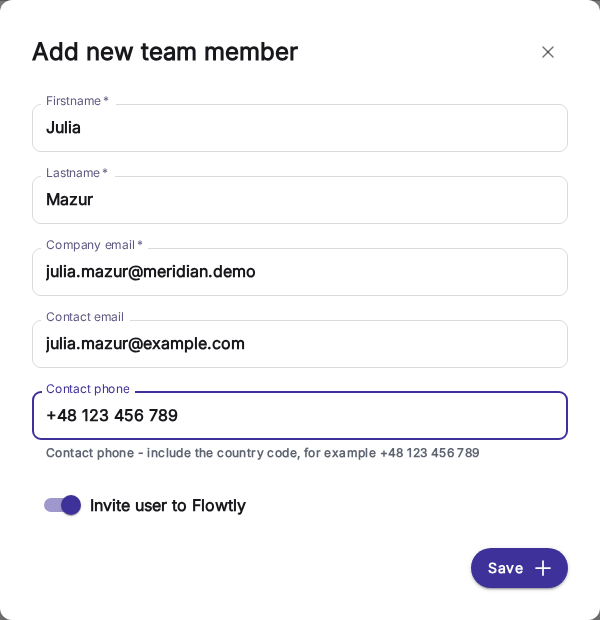
2Give access through permission groups such as Accountancy Manager, Office Manager or People Manager, or copy it from another user. 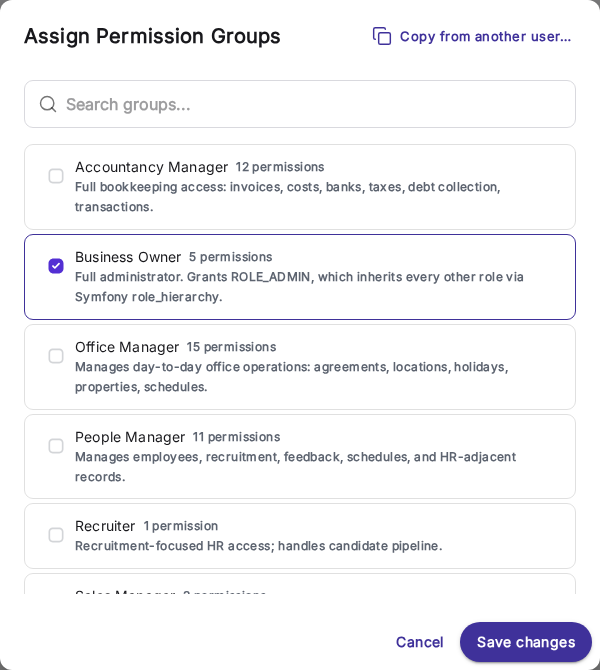
3Add an agreement: its type, a variant such as an employment contract, the position and the start date. 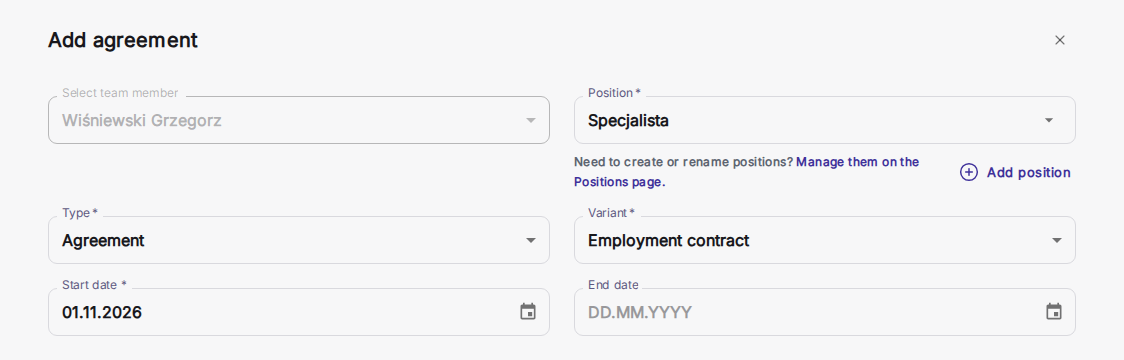
4Everything about a person is a tab on one profile: assignments, permissions, annual time off, agreements, documents, rates, benefits and history. 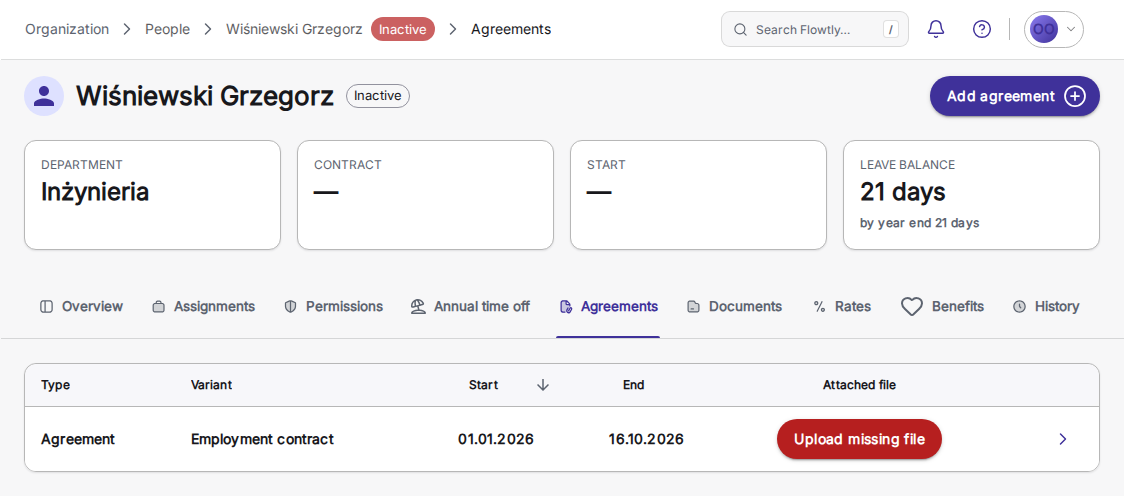
Create and manage agreements with team members
Add an agreement with its type, variant and position, then set the working time: fixed weekly hours give a daily timesheet target and leave that accrues by FTE, while an hourly freelancer has neither.
React to expiring agreements
Flowtly reminds you which agreements need action, and the team list flags anyone without an active agreement.
Offer your team attractive benefits
Configure all the benefits you offer to your employees on a single card.
Get HR documents signed without printing
Upload an NDA or a policy acknowledgement as a PDF, place a signature field for each person and send it. Signers confirm a one-time code from their email, with no Flowtly account, and the Signatures list shows who has signed until the sealed PDF comes back.
Time off balances you can explain
Each person’s annual leave tab shows what is available now and by year end, and how it was worked out: the full-time limit, the FTE share from the contract, days accrued, carry-over and days used. Enter the full-time figure and Flowtly prorates a part-time contract once.
Hiring and growth beside the team member record
Candidates, their CVs and hiring stages live in Recruitment. Once someone joins, their objectives with weighted key results, their reviews and feedback, and the responsibilities of their role sit in the same workspace as their contract, benefits and personal data. Adding a new hire as an employee is a separate step.
Access by permission group
Give each person one or more groups, such as Accountancy Manager, Office Manager, People Manager or Recruiter, each with its own permissions, or copy the access of another user.
A tab for every question about a person
Overview, assignments, permissions, annual time off, agreements, documents, rates, benefits and history are tabs on the same profile, so a question about someone starts and ends on one page.
Team members
- Central team member records and agreementsEach team member’s profile holds personal and contact details, agreements with contract type, period and job size, uploaded documents, project rates, benefits and permissions. Removing someone ends their open agreements but keeps the record, so past hours and time off still read correctly.Read the guide
- Track salaries, benefits, roles, and accessAgreements hold each team member’s pay terms — amount, net or gross, and billing basis — shown only with the Agreements Manager permission. Benefits carry a price, tax rate and company coverage, and the Permissions tab assigns the roles that decide what each person can do.Read the guide
- Capacity and burnout at a glanceUtilisation, overtime, and leave across the whole team. Know when you can take on more work and who is overloaded before it breaks.Read the guide
- Benefits, simplifiedDefine and assign benefits like medical care, sport cards, meals, and insurance with coverage and pricing tiers, history kept clean.Read the guide
- One shared list of positionsDefine job positions once and pick them from the same list on employment agreements and project rates, so a typo never adds a near-duplicate and reports stay consistent. A position still in use cannot be deleted.Read the guide
Agreements
- Contracts and work schedulesEmployment agreements in every variant, plus work schedules, as the backbone of your people data.Read the guide
Document management
- Expiry alerts for documents and end-of-agreement remindersMark a document type as expiring, and people with a documents role get email alerts 14, 7 and 1 day before each document’s expiry date. Team members whose employment agreement is nearing its end date also receive a reminder email.Read the guide
How can Flowtly streamline HR management and contracts?
Chaos in HR? Manual contract management no longer sufficient? Need to digitise your documents?
The core employee management module helps handle HR matters – from managing employee data to digitising contracts. In this module, you can set annual leave limits, rates, and benefits for every employee in your organisation. With a widget that shows contracts nearing their expiration date, you can prepare the necessary documents well in advance and avoid worrying about missing deadlines.
Contract management
Illustrative example
Automatic reminder scheduled for renewal
Where do we store employee contracts?
Will we be warned before a contract expires?
Can we control who sees which employee data?
Can we track the benefits each employee is entitled to?
How does an employee’s rate feed into client invoices?
Learn it step by step
From the knowledge base
Recruitments, candidates and hiring stages
People DashboardSee your whole team at a glance
New EmployeeOnboard a new employee step by step
Objectives (OKR/KPI)Weighted Key Results that can feed performance reviews
FeedbackPerformance reviews and 360-degree feedback
ResponsibilitiesDuties grouped into role profiles per position
SignaturesSend any document for e-signature and track every request
Related terms
Answer any question about a team member from one profile