Book desks, rooms and equipment without double bookings
People reserve a resource from a date, for a period or permanently, and an overlapping booking is refused. Each asset shows who or which project holds it, and for leased space the booked unit’s billing rates apply to the project automatically. Resource booking is part of the Enterprise plan.
People book for minutes, hours or days, in the browser or on their phone.
3
Avoid double bookings
A booking that overlaps an existing one is refused, and the list shows who has what.
How it works in Flowtly
Screenshots of the running product, taken in demonstration organisations with sample data. Select a screenshot to open it full size. Some of these screens show the Polish interface.
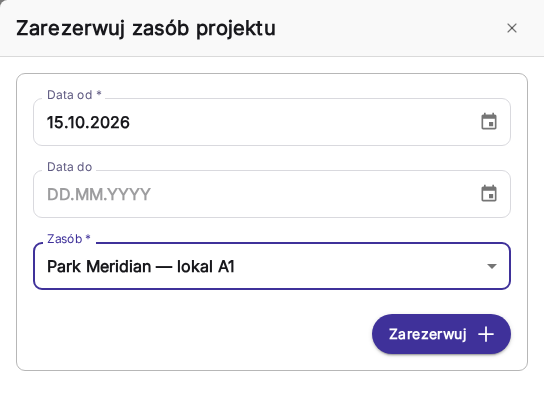
1Reserve a resource for a project from a start date; the end date is optional.
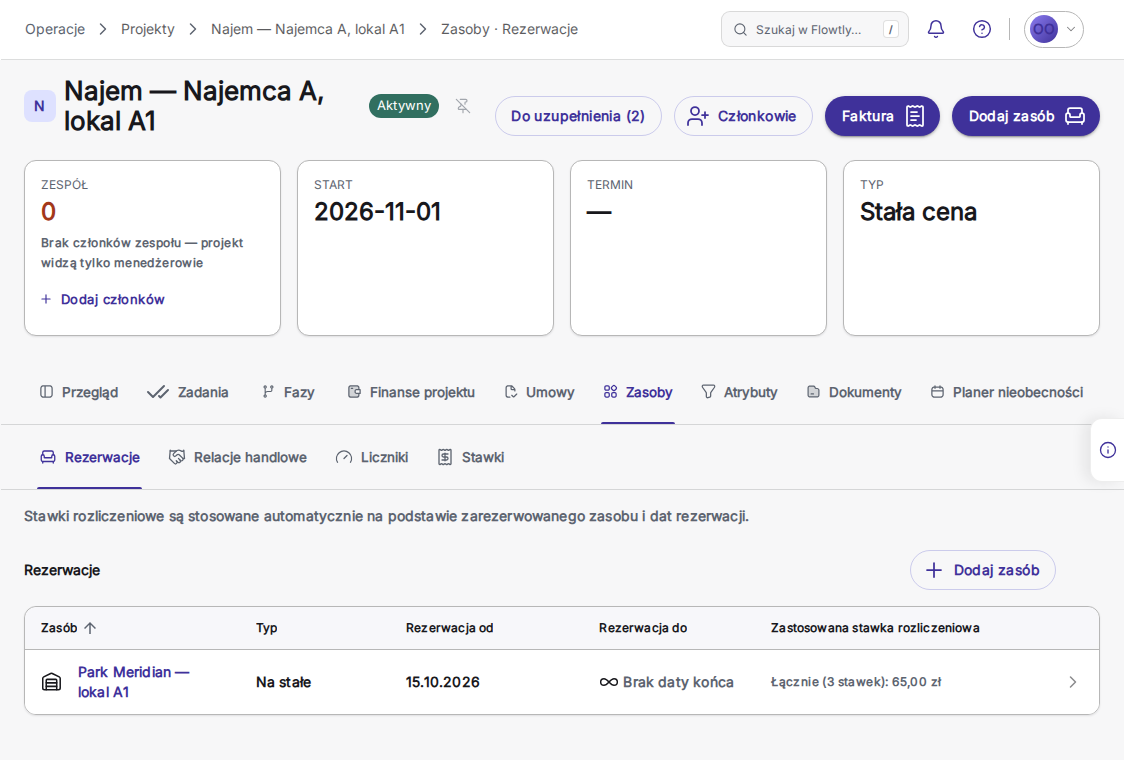
2The project’s reservations show a permanent booking, with billing rates applied automatically from the resource and the booking dates.
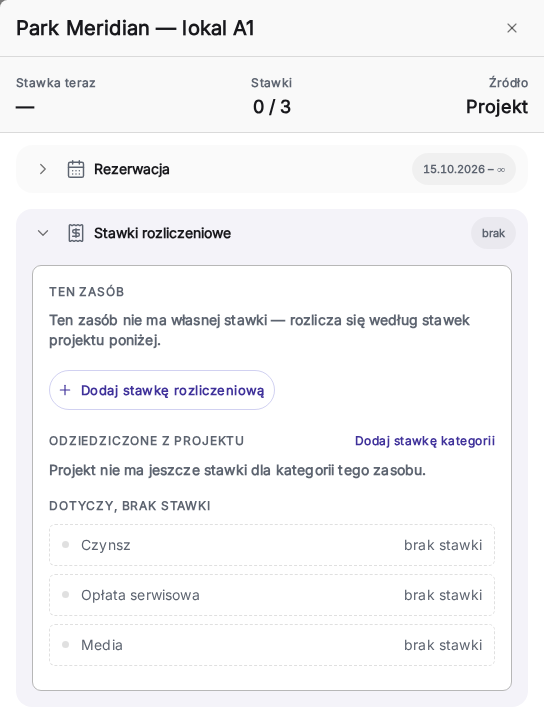
3A booked unit with no rates of its own bills at the project’s rates, category by category: here rent, service charge and utilities, not priced yet.
Self-service, from any device
Employees book or cancel a resource themselves from the calendar, in the browser or the installed Workspace app, without asking an office manager.
Flexibility of configuration
Your resources can be configured to suit your needs. If you have resources in different locations, organise them in the system so you can manage all bookings in one place.
Devices under control
If your company has computer equipment used by your employees, the resource booking system allows you to keep it under control: the serial number, warranty and purchase document.
Permanent or dated bookings
Reserve a resource from a start date, with or without an end date. A permanent desk stays assigned until someone cancels or reassigns it.
Who has what, at a glance
The asset list names the person or project holding each resource, even a laptop issued for the long term and kept out of booking. A permanent desk stays assigned until someone cancels or reassigns it, and a booking that overlaps an existing one is refused.
Patrol and cleaning rounds, checked
A scan of the asset’s QR code records the visit; the Service rounds view tells you whether the round was on time. Set a three-shift patrol at 06:00, 14:00 and 22:00 with a 30-minute grace window, and each round shows as done, late, partial or missed.
Billing rates that follow the booking
When a project books a leased unit, the unit’s billing rates, such as rent, service charge and utilities, apply automatically for the booked dates, and meter consumption on booked assets can go on the client invoice, one line per meter.
Resource booking
Book rooms, vehicles, desks or equipment
Calendar-based self-service reservations
Avoid double bookings and conflicts
Usage tracking and assignment history
Asset meters and usage-based maintenance tracking
Property and room bookingManage reservations and occupancy across properties and rooms, see availability at a glance, and avoid double-bookings.Read the guide
Asset and equipment trackingTrack physical and operational assets with meters and readings, so maintenance and lifecycle cost stay under control.Read the guide
Scan-to-act asset QR codesPrint a branded QR code for any asset so anyone nearby can report a problem, or log a security patrol or cleaning visit, in one scan. Issue reports can be public or sign-in-only, and every scan is tied to the exact asset.Read the guide
Who holds each resourceThe asset list names the person or project holding every resource, including long-term equipment kept out of booking. Open-ended assignments never lapse on their own, and a booking that overlaps an existing one is refused.Read the guide
Service rounds you can verifySchedule security patrol and cleaning rounds with expected times and a grace window. Staff scan the checkpoint QR codes, and the Service rounds view shows each round as done, late, partial or missed, with scan times and, where recorded, who did the round, for any date range.Read the guide
Meter consumption on the client invoiceBill the meters on a project’s booked assets on its invoice, one line per meter. Prorate a month across the readings either side of it, even when the month has no reading of its own, or bill exactly the difference between two readings you pick, then check each line in a preview before the draft is created.Read the guide
Meter readings read from a photoImport readings from a photo of a meter, a readings sheet or a utility bill as well as from an Excel export. Flowtly reads the values and suggests the meter; nothing is saved until you have checked them.Read the guide
A project’s assets, meters and rates in one tabThe project’s Assets tab holds its reservations, commercial relations such as parking access, its meters with the price the client pays per unit, and the billing rates for its assets, each editable by the role that owns it.Read the guide
Rent billed per m², tenant by tenantFor each park, see what you invoiced each tenant per square metre of leased area, for rent, service charge or utilities, against the park average and over time, and reconcile it with the property manager’s own sheet.Read the guide
Tenant turnover and sales per m²Enter each retail tenant’s monthly sales in one grid, then rank tenants by sales per square metre of the floor area their leases cover. A month nobody reported stays blank and is never counted as a zero.Read the guide
How can Flowtly optimise shared resources in hybrid offices?
Problem
One desk, too many people interested?
The need to send emails to the entire company just to book a parking space?
Coordinating office resources in the age of hybrid work is a real challenge?
Solution
Flowtly not only allows all employees to view available resources in real-time, such as desks, IT equipment, and parking spaces, but also lets them book these resources independently. This way, everyone can plan their work, no one blocks equipment for others, and the company efficiently monitors and inventories its resources.
Book office resources
Illustrative example
Desk #14Available
Parking P3Booked
Reserve now
Planned for this module
Not available yet. These are on our roadmap with no date; what the module does today is described above.
Planned
Work orders and maintenance requests
Log a property maintenance request and follow it as a work order.
What happens if two people book the same resource?
A booking that overlaps an existing one is refused, so a desk, room, vehicle or device cannot be double-booked.
Can a desk or a laptop be assigned permanently?
Yes. A booking can start on a date with no end date, and a permanent desk stays assigned until someone cancels or reassigns it. The asset list names the person or project holding each resource, including a laptop issued for the long term and kept out of booking.
Can a booking feed a tenant’s invoice?
Yes, for leased space. The booked unit’s billing rates, such as rent, service charge and utilities, apply to the project for the booked dates, and meter consumption on booked assets can be billed on the client invoice, one line per meter.
What do our customers say about Flowtly?
Since implementing Flowtly, we can conveniently monitor our resources and their usage. Additionally, shared company resources are accessible to everyone for reservations, helping to avoid misunderstandings and enhancing the comfort of hybrid work.
Result: Resources and their usage are now easy to monitor across the organisation.