See what time off costs before you request it
Before a request reaches the approver, Flowtly shows the working days it costs, the balance before and after, and any overlap, and every entitlement comes with the calculation behind it.
How it works
Set leave types and limits
Define leave types and yearly limits, and balances calculate themselves.
Request time off
A team member sees the balance and the working days it costs, then sends the request.
Approve it
A named approver signs it off and the team calendar updates.
How it works in Flowtly
Screenshots of the running product, taken in demonstration organisations with sample data. Select a screenshot to open it full size.
1Before a leave request is sent, it shows what it changes: the days it uses, the balance now and to year end, and whether it fits. 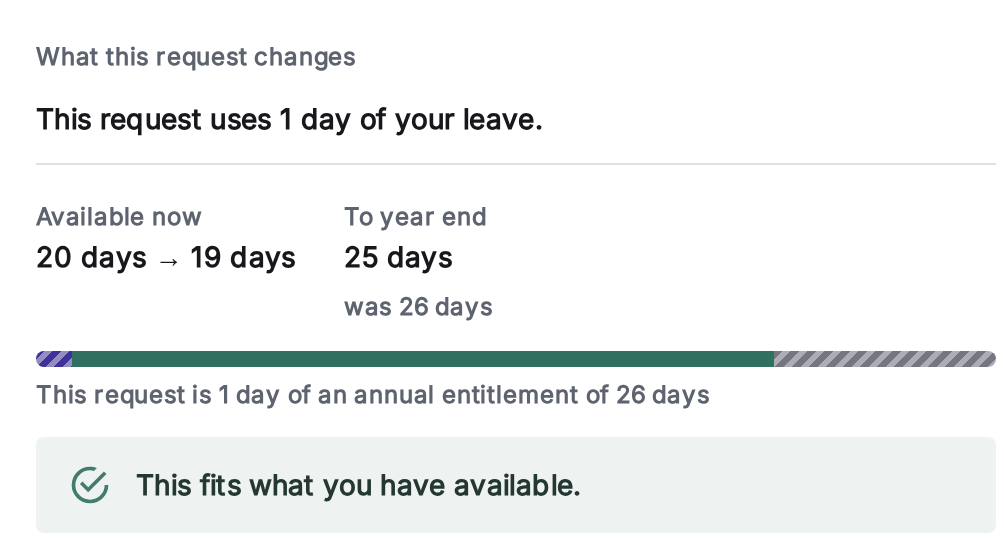
2Each person’s time-off balance shows what is available now, what has accrued and what is left by year end. 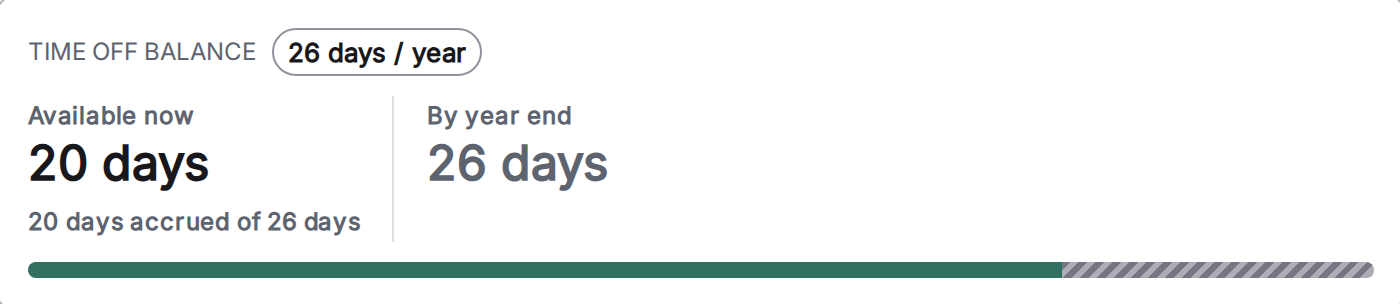
3Set the working time on the agreement: weekly hours give the FTE, the daily timesheet target and how leave accrues. 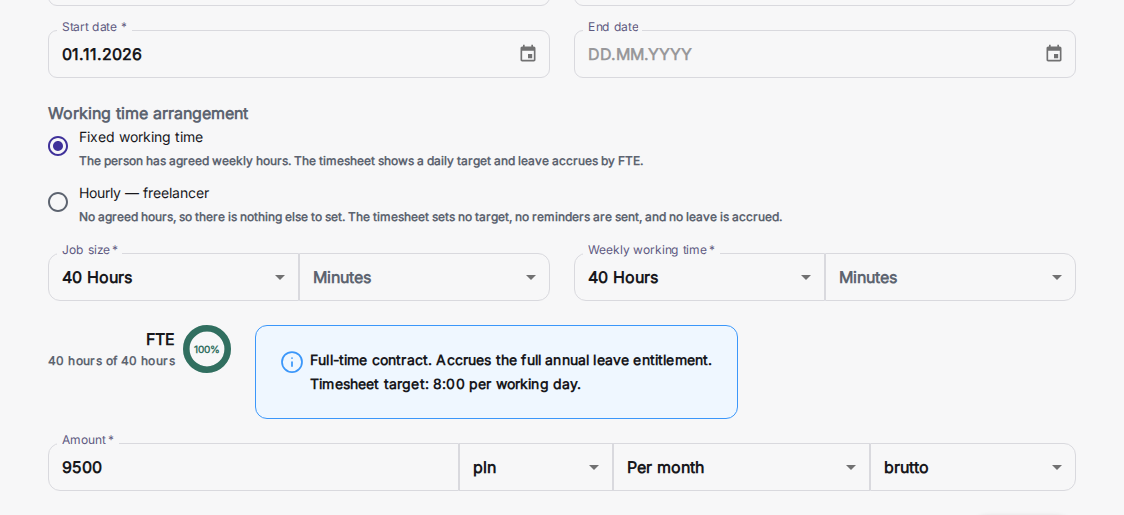
Include public holidays
Our application automatically takes public holidays into account and excludes them when calculating time.
Set time off limits for each employee
Set a default limit for the organisation and individual limits where a contract or seniority calls for one. Employees see what is available now and by year end, and the annual leave tab shows the calculation behind it: full-time limit, FTE share from the contract, days accrued, carry-over and days used.
Manage vacations of your employees
All leave requests are collected in one place, regardless of type.
Make it easier for employees to report absences
Pick a type and dates and see, before sending, how many working days the request costs, your balance now and after, what is left by year end, and whether it overlaps an absence you already booked. It also names the approver and says when a document is required.
Manage time off requests
Requests go to the person’s assigned approver, line manager or department manager, with one or several approvals required. Managers can also record an absence straight away, and admins and HR managers can file a request on someone’s behalf that goes through the usual approval.
Time off
- Country-specific holiday calendars
- Request, approve, and log time off
- Track leave balance in real time
- Sync absences to shared calendars
- Leave and holidays, managedHoliday types, requests with one or several approvers, balances and public holidays in one place. Managers can record an absence straight away, and admins and HR managers can file a request on someone’s behalf that goes to that person’s approvers. No leave spreadsheet.Read the guide
- A leave request’s impact, before it is sentPick a type and dates and the request shows the working days it costs, with weekends, public holidays and the person’s own schedule taken out, the balance now and after, what is left by year end, and any overlap with an absence already booked. It names the approver and says when a document is required; taking leave ahead of accrual is possible only where your organisation allows it.Read the guide
- Leave balances that explain themselvesEveryone sees what is available now and what they will have by year end, and the annual leave tab shows how the figure was reached: the full-time limit, the contract’s FTE share, days accrued so far, carry-over, lapsed and used days. A part-time entitlement is prorated once, by Flowtly, from the contract.Read the guide
- Days given back in lieu, kept apart from annual leaveRecord a day given back, for example for a public holiday that falls on a Saturday, as a pick up day drawn on its own granted allowance, so the annual leave balance stays untouched. A request the allowance cannot cover is refused.Read the guide
How can Flowtly make vacation planning effortless?
Constant questions about available vacation days? Struggles with scheduling during vacation or sick leave periods? The need for precise calculations of entitled leave?
Before an employee sends a request, Flowtly shows what it costs in working days, the balance now and after, and whether it overlaps an absence they already have. The annual leave tab explains how each entitlement was worked out, so balance questions answer themselves. Requests follow single- or multi-step approval, and managers can record an absence directly or file a request on someone’s behalf.
Before you send
Illustrative example
It fits: within the leave you have already accrued
Send requestCan requesting and calculating leave be simplified?
Can a manager record leave for someone else?
Learn it step by step
From the knowledge base
Submit a holiday or leave request
Managing Holiday RequestsReview and approve employee leave requests
Holiday TypesSet up different types of leave
NotificationsGet leave requests and approvals on your phone
Annual LeaveHow each entitlement is calculated, from limit to days used
Related terms
See what time off costs before you request it