Team workflows with financial clarity built-in
Flowtly shows how your team works, what it costs, and what it delivers. Time tracking, hiring, invoicing, and employee data connect in one place, giving small businesses the structure and visibility they need to operate with confidence.
How it works
Bring in the team
Add people, their roles and their leave limits.
Track the work
Log time against projects in the browser or on a phone.
See the margin
Work, cost and billing connect, so margin shows without a spreadsheet.
Small teams can schedule work, log time, and keep billing aligned without extra admins.
· Built for small businesses
How Flowtly helps small businesses
Live link between work, cost, and billing
Hiring and onboarding tied to delivery
Visibility into margin without spreadsheets
What that looks like in Flowtly
- A leave request shows the working days it costs, the balance before and after and any overlap with an absence already booked, before it is sent.
- A project template sets up phases, task lists and tasks timed from the start date in one step.
- Permission groups such as Office Manager, People Manager and Recruiter give each person the access their role needs.
How it works in Flowtly
Screenshots of the running product, taken in demonstration organisations with sample data. Select a screenshot to open it full size.
1Add an organisation, the shared workspace for your team, projects and billing, with its language and country. 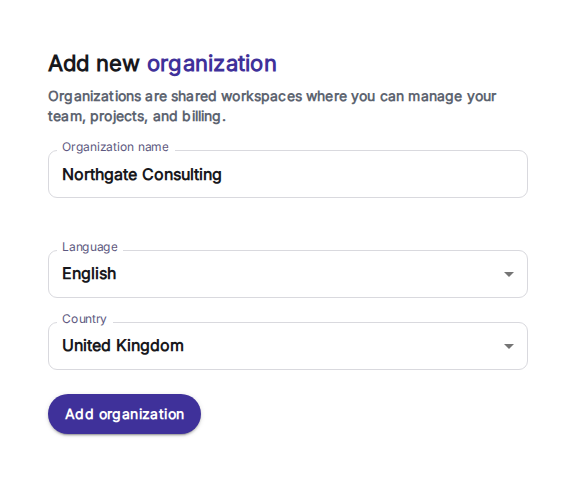
2Add a team member with name, company email and phone, and invite them to Flowtly in the same step. 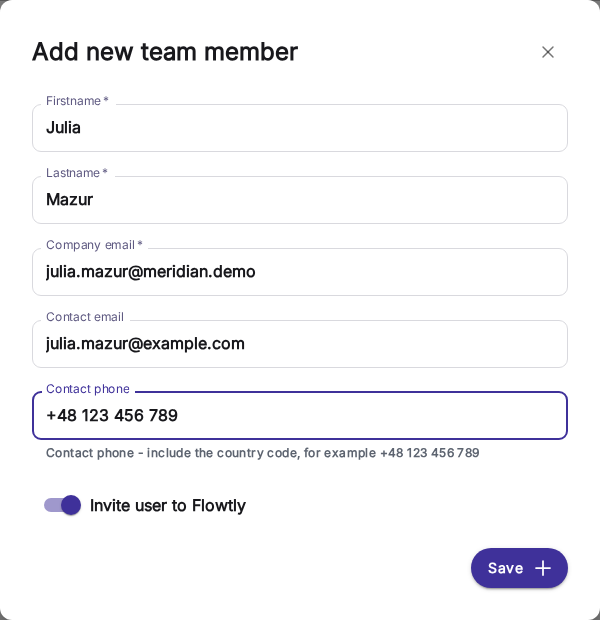
3Invoices are grouped by month, with the payment status on every row and a column for e-invoicing status. 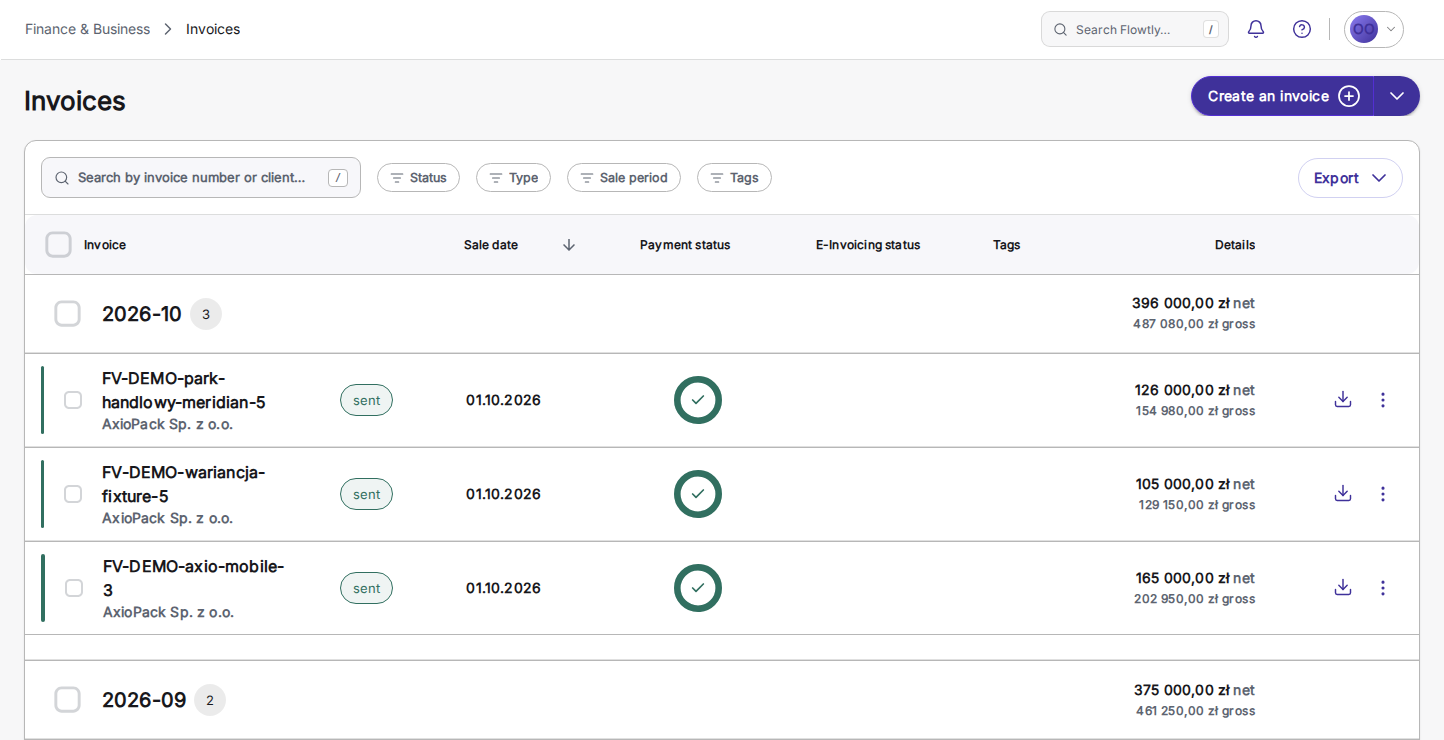
What small businesses can switch on
Each block is a capability you can enable to match how your team works.
A leave request’s impact, before it is sent
Pick a type and dates and the request shows the working days it costs, with weekends, public holidays and the person’s own schedule taken out, the balance now and after, what is left by year end, and any overlap with an absence already booked. It names the approver and says when a document is required; taking leave ahead of accrual is possible only where your organisation allows it.
Read the guideInstall Workspace on your phone or computer
Work in the browser, or install Flowtly Workspace from it on iPhone, Android or desktop for its own window and home-screen icon, with no app store needed. Flowtly Workspace for Android is also on Google Play. It is the same workspace, with the same data and permissions.
Read the guideNotifications that take you to the right place
Allow notifications on each device you use, and approvals, requests and reminders reach your browser, installed app or phone lock screen. Tapping one takes you to what it is about, and the bell menu keeps the same feed inside the workspace.
Read the guideA whole working day from your phone
A notification reaches your lock screen; tap it and you land on the record it is about — an approval waiting, a request to review. From the same installed workspace you log the hours you just worked, or file a leave request that shows the working days it will cost before you send it. It is the same workspace as on your laptop, with the same data and the same permissions.
Read the guideA home screen that puts your work first
Administrators choose which dashboard widgets your organisation shows and which lead. Each person can then arrange their own home screen, on a phone with simple move up and move down controls, and return to the organisation’s order at any time.
Read the guideTurn a prospect into a customer and a deal in one step
Convert a prospect into a new or existing customer: its contacts are copied across, a deal opens in the first pipeline stage with Prospect as its origin, and the prospecting timeline stays where it was.
Read the guideClose deals as won or lost, with reasons you can count
Drop a deal on Won or Lost below the pipeline board, with Undo right after. Lost asks why from a fixed list of reasons, plus an optional note. Closed deals move to the List tab, where you filter by status and reopen one that comes back.
Read the guideProject templates with phases and relative dates
Describe a repeatable project once: phases, task lists and tasks, each timed in days from the start. Pick a start date, preview the dated plan and create the whole structure in one step. Unlike recurring tasks or task templates, it sets up an entire project; the template holds structure and timing only, so no client, team, rates or budget are copied.
Read the guideRecruitment: candidates, CVs and hiring stages
Open a recruitment for each role with its requirements, owners and salary range, and keep every candidate’s CV, notes and skills on one profile. Drag candidates across the recruitment’s stages: applied, best selected or rejected. Needs the Candidates Manager role.
Read the guideCompany policies with dated versions
Administrators publish each policy as dated versions that cannot be edited or deleted; a correction is published as a new version. A rule that changes next month can be published now with that start date: today’s wording stays in force until then, and choosing an earlier date in the history shows the wording that applied on that day. Every employee can read every policy.
Read the guide