From first contact to won deal, next to your projects and invoices
One client and contact database, a sales pipeline with weighted value and funnel drop-off, prospects converted to customers in one step, and lost deals recorded with a reason.
How it works
Capture the lead
Add prospects and log every contact with them.
Work the deal
Convert a prospect into a client and move the deal through your pipeline stages.
Close and deliver
Close on Won or Lost with a reason, then open the project when you are ready.
How it works in Flowtly
Screenshots of the running product, taken in demonstration organisations with sample data. Select a screenshot to open it full size.
1Add a client by tax ID, with the address and the currency you invoice them in. 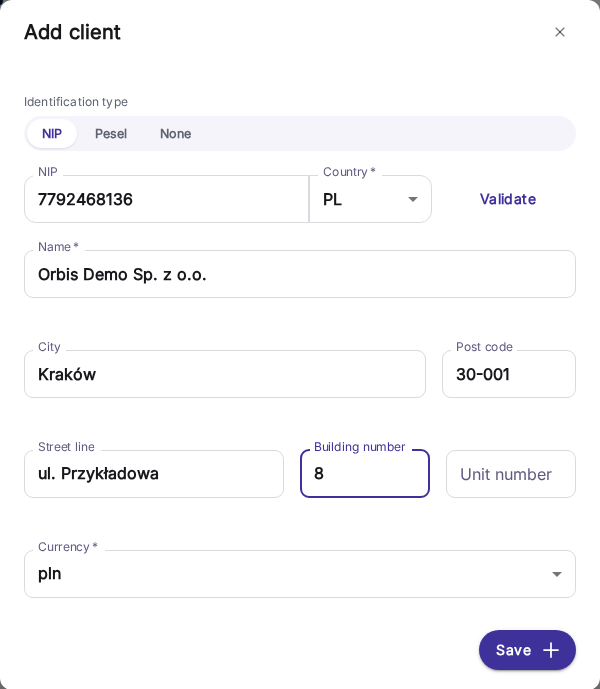
2The client card holds payment terms, currency, document language, related projects and notes. 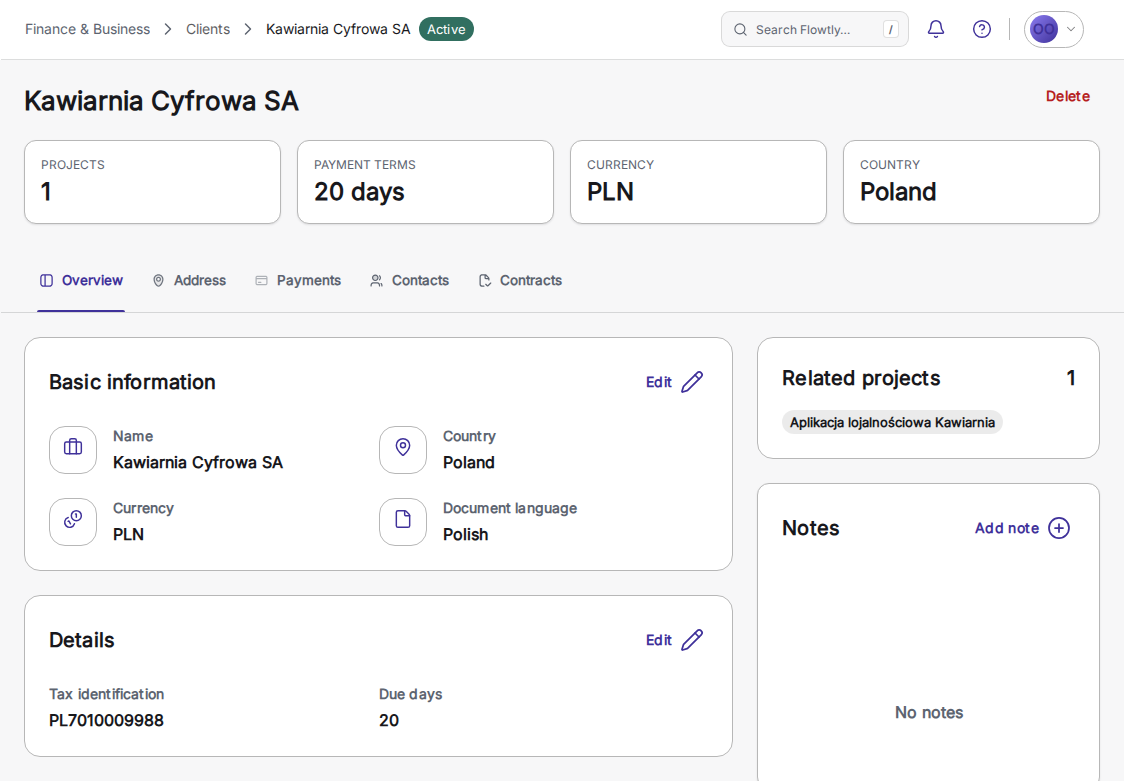
3Add contacts by type, such as a billing contact with a job title, so each message reaches the right person. 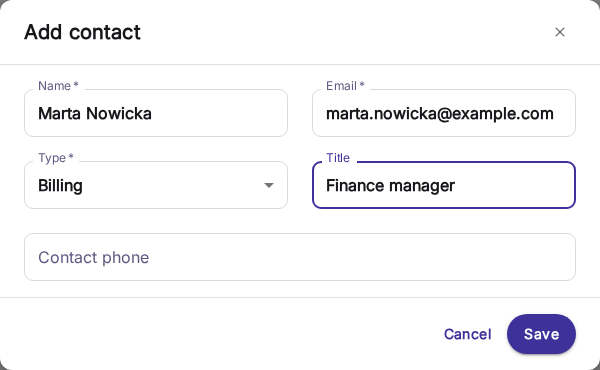
4Clients carry their country, currency, tax ID and the projects linked to each. 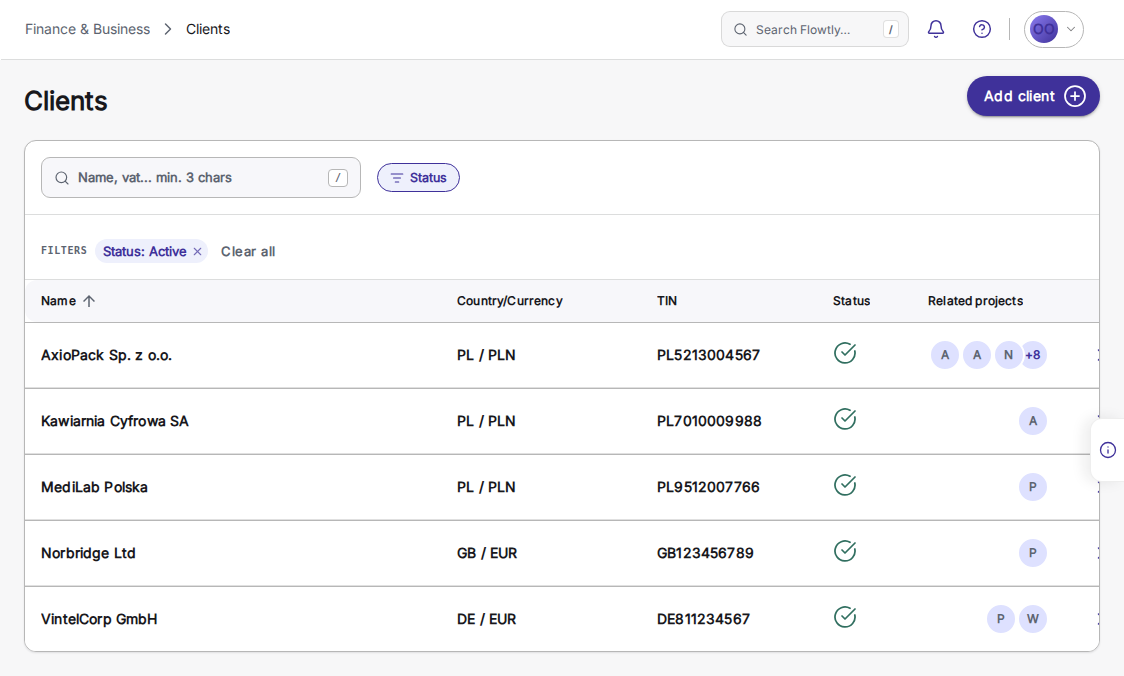
Invoicing & clients
- Suppliers and clients, auto-enrichedKeep one registry of every client, supplier, and partner with tax IDs and payment terms, automatically enriched with public business data, with duplicate detection and merge to keep it clean.Read the guide
CRM
- Track deals through your sales pipelineCreate a deal with a customer, amount and stage, then drag it across the board, one column per stage. Open and weighted pipeline totals stay separate per currency, and cards are flagged when past their close date or untouched for 30 days.Read the guide
- Work prospect lists and qualify companies into dealsWork prospect companies through lists, from New to Contacted to Qualified, logging messages, calls and meetings by channel. Do not contact locks a company against further logging, and a qualified company becomes a customer and a deal in one step.Read the guide
- Sales dashboard with weighted pipeline and funnel drop-offThe sales dashboard shows open and weighted pipeline, lists every overdue or stalled deal under Needs you, and follows prospects through a funnel to won deals, with the drop-off at each step and the biggest leak named.Read the guide
- Turn a prospect into a customer and a deal in one stepConvert a prospect into a new or existing customer: its contacts are copied across, a deal opens in the first pipeline stage with Prospect as its origin, and the prospecting timeline stays where it was.Read the guide
- Close deals as won or lost, with reasons you can countDrop a deal on Won or Lost below the pipeline board, with Undo right after; Lost asks for a reason from a fixed list. Closed deals move to the List tab, where you filter by status and reopen one that comes back.Read the guide
Integrations & automation
- Close deals and log work from a chatAsk your connected assistant to mark a deal won, close a prospect or deal as lost with a reason from your list, log hours or update a task. Each is a named action within what your own account may do.Read the guide
Planned for this module
Not available yet. These are on our roadmap with no date; what the module does today is described above.
- Planned
Quotes and estimates
Draft a quote, send it for approval and turn the accepted quote into a project and its first invoice.
- Planned
Lead-capture forms
A form on your own website that adds each enquiry to the CRM as a lead.
- Planned
Client portal
A shared space where a client sees their projects, documents and invoices.
Learn it step by step
From first contact to won deal , next to your projects and invoices